③ Assigning Products to Slots
Once your products are created, you need to assign them to the machine's slots before the machine can sell them. Assigning products and restocking are done on the same page.
Opening the Slot Page
Menu: Devices › Device List, find the target device card and click Restock.
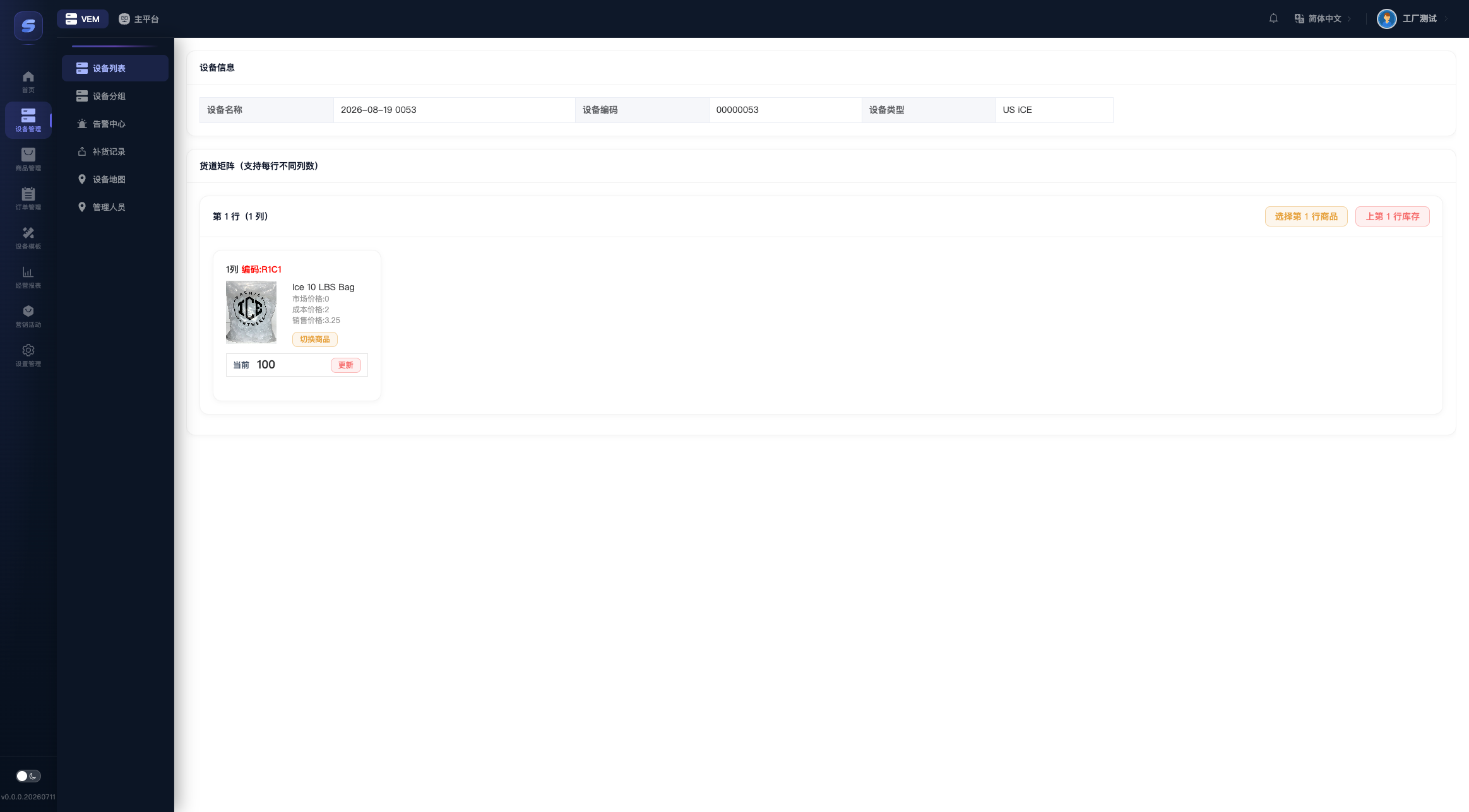
The top of the page shows the device info (name/code/type, read-only). Below it, the slot matrix is displayed row by row — each cell corresponds to one slot in the machine and shows the slot code, the assigned product, and the current stock.
Where does the slot layout come from?
The number of rows and columns, the slot codes, and the max stock are predefined by the channel in the "Device Type". Merchants can only assign products and adjust stock — you cannot add or remove slots. If the slot layout does not match the actual machine, contact the channel to adjust the device type.
Assigning a Product to a Slot
- Single slot: click Select on an empty slot, or Change product on a slot that already has one. In the product picker, filter by category/name and click a product — it takes effect immediately, no extra save needed.
- Whole row at once: click the Row N products button at the top right of the row card. The selected product is applied to every slot in that row (handy when a whole row sells the same product).
Adding Stock to a Slot
- Single slot: click the Update button in the slot cell. The dialog shows
Current: x / Max: y. Enter the quantity to add this time (a negative number removes stock), or click Fill Max to top it up in one click, then click Confirm Update. - Fill a whole row: click the Row N stock button at the top right of the row card. After confirming, every slot in that row is topped up to its own max stock.
Note
- A single restock cannot exceed "max stock − current stock", and a stock removal cannot exceed the current stock.
- Whole-row operations run slot by slot. If an error occurs midway, refresh the page and verify the actual result.
Every successful restock is written to the Restocking Records, and the system also notifies the device to refresh its product and stock display.